
Privacy Under Siege: Inside the Battle Over Windows 11’s Hidden Global Device Identifier and the Rise of "deGDID"

Executive Overview
In the modern digital landscape, the boundary between user convenience and intrusive telemetry has grown perilously thin. For years, operating systems have relied on deep-seated identifiers to diagnose system failures, coordinate cloud ecosystems, and verify hardware authenticity. However, when these internal mechanisms intersect with law enforcement and corporate surveillance, the hidden gears of our personal computers are thrown into sharp relief.
The controversy intensified following a federal criminal case where Microsoft’s Global Device Identifier (GDID)—a deeply embedded hardware and software tracking token within Windows 11—was leveraged by the FBI to trace and apprehend an alleged cybercriminal linked to the notorious "Scattered Spider" extortion syndicate. While law enforcement hailed the breakthrough, privacy advocates and security researchers sounded immediate alarms. The GDID operates below traditional network layers, rendering standard virtual private networks (VPNs) and IP maskers completely obsolete. Furthermore, Windows 11 offers no native toggle, switch, or opt-out mechanism to disable or purge this identifier.
In direct response to this unyielding form of persistent tracking, popular VPN provider Windscribe has developed an open-source countermeasure dubbed "deGDID." Distributed freely via GitHub, this PowerShell-based script aims to strip the GDID from unmanaged Windows 11 installations, effectively placing a firewall between the operating system and Microsoft’s internal identity infrastructure.
Yet, this digital rebellion comes with a steep operational toll. Because the GDID is intimately tied to Microsoft’s core cloud architecture, obliterating it inevitably breaks vital operating system functions, restricts Microsoft account authentication, and degrades online service integration. As the debate over digital sovereignty reaches a fever pitch, deGDID serves as both a radical proof-of-concept for user privacy and a stark reminder of how deeply modern operating systems depend on persistent cloud-linked telemetry.

Detailed Chronology of the GDID Controversy
The Catalyst: The Scattered Spider Arrest
The genesis of the current public outcry traces back to a high-profile federal investigation into Scattered Spider, a sophisticated financially motivated cybercrime group notorious for high-level social engineering, SIM-swapping, and enterprise-level ransomware attacks. During the course of the manhunt, federal investigators utilized telemetry data provided voluntarily or via subpoena by Microsoft. Specifically, investigators zeroed in on a unique Global Device Identifier (GDID) associated with a Windows 11 machine used by a 19-year-old US-Estonian national allegedly tied to the collective.
While the identification of a malicious actor was celebrated within law enforcement circles, cybersecurity experts quickly realized the broader implications. The GDID was not a temporary session token or a routine cookie; it was a permanent, hardware-and-software-bound fingerprint capable of tracking an individual across multiple IP addresses, internet service providers, and physical locations. Because this identifier exists beneath the network layer, even users exercising best practices—such as routing their web traffic through encrypted VPN tunnels—remained persistently identifiable to Microsoft’s servers through the GDID framework.
The Rise of Windscribe’s deGDID
Recognizing that millions of everyday consumers and privacy-conscious professionals were carrying a silent, un-deletable tracker on their Windows 11 rigs, the engineering team at Windscribe decided to take matters into their own hands. Eschewing passive complaints, the company designed an active mitigation tool: an open-source script named deGDID.
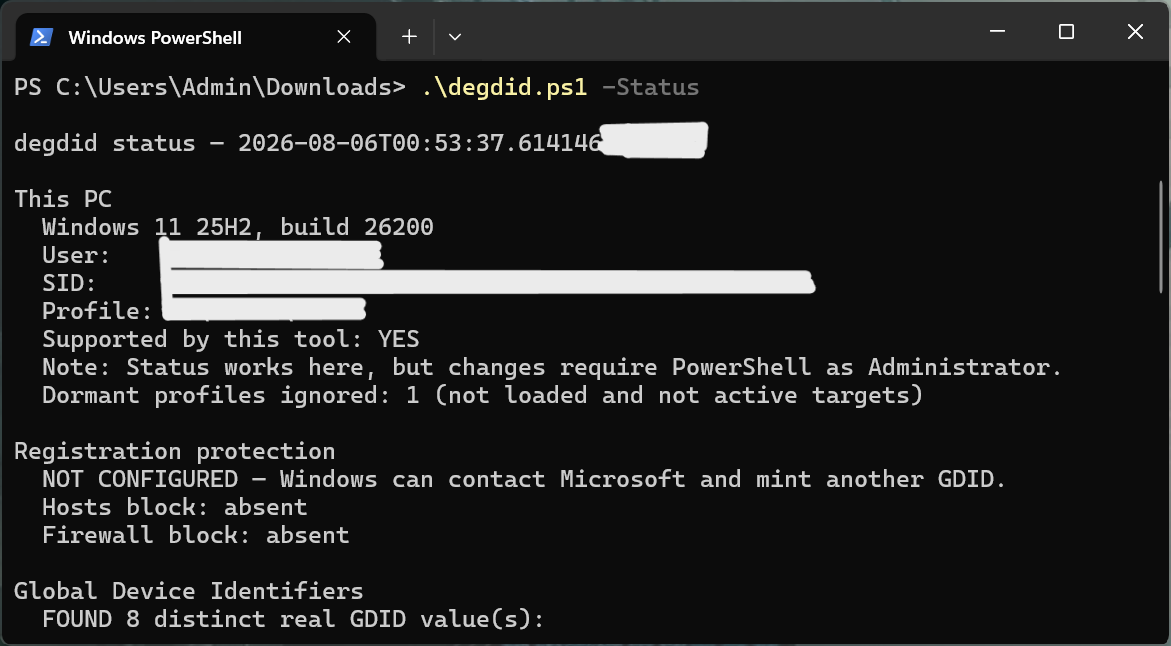
Designed to run natively within PowerShell under administrator privileges, deGDID approaches the GDID problem through a multi-pronged execution model governed by specific command-line flags:

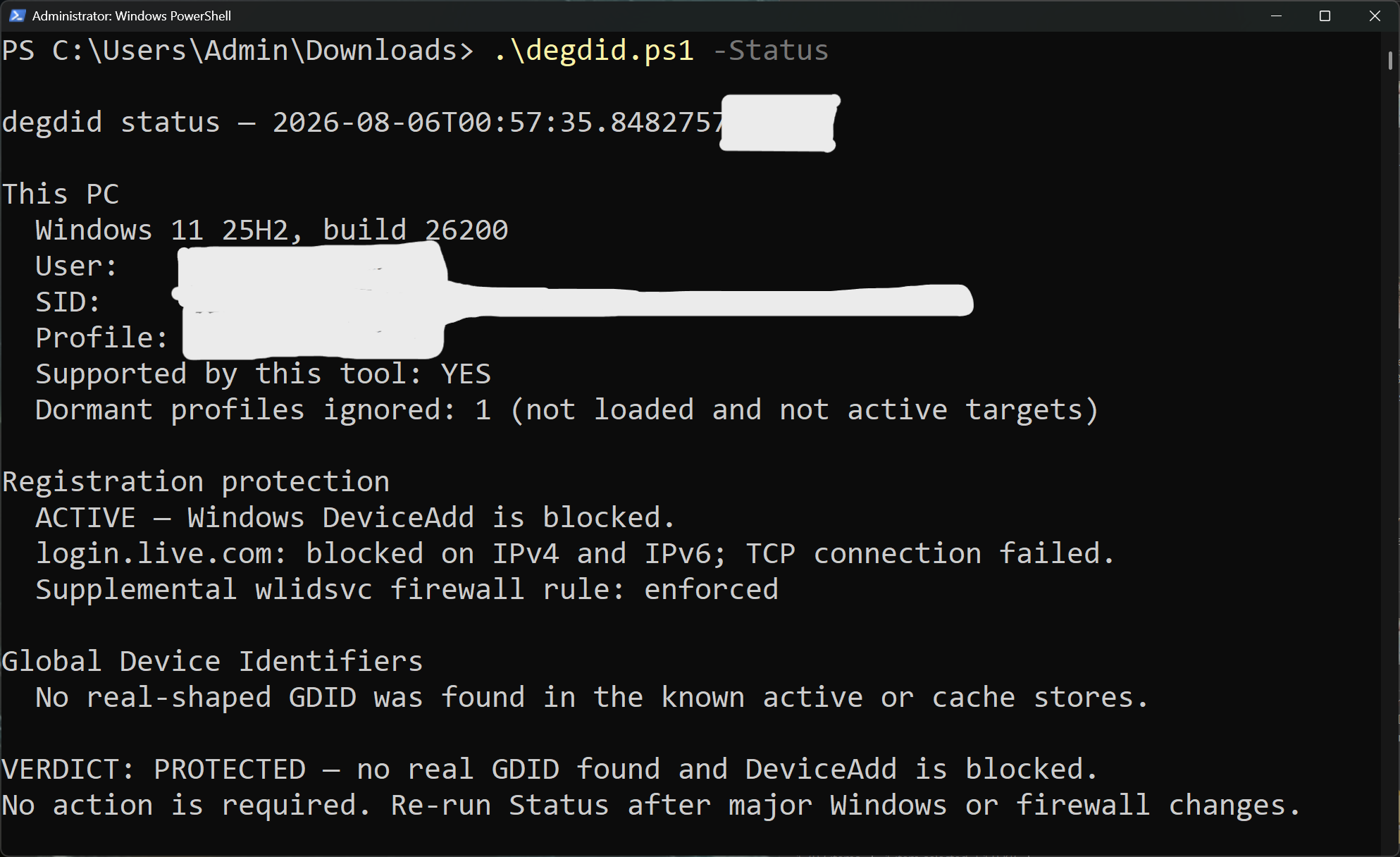
-Status: A read-only audit flag that scans the host machine’s registry and diagnostic logs to determine if an active GDID is currently operating on the system.-Status -Redact: A diagnostic utility that generates system logs with the local GDID intentionally redacted, allowing users to safely share troubleshooting data with IT support or community forums without leaking their persistent device fingerprint.-Protect: The core aggressive flag. This command completely wipes existing cached GDID keys from the system registry and actively prevents the operating system from generating new ones.-Unprotect: A restoration flag allowing users to reverse the script’s modifications and return the operating system to its default factory-configured telemetry state.
Technical Mechanics: How deGDID Dismantles the Tracker
Executing the -Protect flag requires a sophisticated understanding of how Windows 11 handles telemetry caching. When Windscribe initially tested manual registry scrubbing on virtual machines, they discovered that Windows would silently re-mint new GDID keys in the background almost immediately upon rebooting or whenever the operating system re-established contact with Microsoft’s backend servers.
To permanently close this loop, deGDID executes a precise "one-two punch":
- Registry Purging: The script scours system registry hives for server-issued GDID keys that remain cached locally, executing a deep scrub to erase all traces of the current identifier.
- Access Control List (ACL) Modification: To prevent Windows from re-fetching or re-minting the keys, the script alters Access Control Lists and registry permissions. It effectively erects a software firewall against the internal
DeviceAddendpoint. By cutting off Microsoft identity services from recognizing the local installation as a registered Windows device, the OS is starved of the mechanism required to regenerate the persistent fingerprint.
Supporting Context & Technical Metrics
To fully understand the gravity of deploying deGDID, one must weigh the privacy gains against the functional sacrifices. When independent testers executed the script on pristine Windows 11 test beds, the results confirmed both the efficacy of the tool and the unavoidable collateral damage inflicted upon the operating system.
Functional Breakdown of deGDID Execution
| Execution Flag | Primary Function | System Impact / Side Effects |
|---|---|---|
-Status |
Audits the registry for active GDIDs. | None (Read-only diagnostic). |
-Status -Redact |
Exports diagnostic logs with hidden GDID tokens. | None (Safe for troubleshooting). |
-Protect |
Wipes cached keys and blocks DeviceAdd endpoints. |
Breaks Microsoft account authentication, disables certain cloud services. |
-Unprotect |
Restores default Windows registry permissions and keys. | Reverts system to original telemetry tracking state. |
The Trade-off: Broken Cloud Services and Authentication Hurdles
When the -Protect flag is engaged, the disruption to normal Windows behavior is immediate. Because Microsoft’s ecosystem heavily intertwines operating system licensing, account management, and cloud application access through unified identity pipelines, blocking the DeviceAdd endpoint has cascading effects:
- Browser-Based Microsoft Logins: Attempts to authenticate via
login.live.comacross major web browsers (including Google Chrome, Mozilla Firefox, and Microsoft Edge) are systematically blocked, returning severe connection and verification errors. - Enterprise vs. Consumer Login Divergence: Interestingly, testing revealed that enterprise-facing authentication portals—such as
login.microsoftonline.com—retained partial functionality, though consumer-tier accounts experienced significant degradation. - Applications and Games Unscathed: Crucially, local applications, standalone software suites, and online video games continued to function normally. The disruption is strictly localized to Microsoft’s cloud-backed identity and account verification pipelines, proving that the GDID is primarily a telemetry and authentication tether rather than a mandatory graphics or runtime dependency.
Limitations of the Script
While deGDID represents a milestone in client-side privacy tooling, the script comes with inherent boundaries:
- Server-Side Persistence: Once a GDID has been transmitted to Microsoft’s remote servers, that historical record remains in Microsoft’s possession indefinitely. Local deletion only prevents future tracking from that specific point forward; it cannot erase historical telemetry already logged in the cloud.
- Environment Restrictions: deGDID is built strictly for unmanaged, personal computer systems equipped with local administrator accounts. If a PC is joined to an enterprise Active Directory, corporate domain, or educational network managed by group policies, the script will intentionally refuse to execute to prevent breaking organizational compliance.
Official Statements and Industry Reception
The release of deGDID has ignited fierce debates across software engineering forums, cybersecurity channels, and privacy advocacy groups.
Windscribe framed the project primarily as an exploratory research initiative rather than a silver-bullet product for mainstream consumers. In official project documentation, the developers emphasized that the tool is designed to spark a much-needed industry conversation about un-toggleable telemetry. "Windows has no native switch to turn off GDID," a Windscribe spokesperson noted during initial deployment. "It exists as a permanent device ID that tracks users without explicit, granular consent. Because it operates beneath network layers like VPNs, everyday users are left completely unprotected against deep system profiling."
Industry analysts have drawn parallels between the GDID controversy and historic backlashes against Windows telemetry, such as the initial rollout of diagnostic data collection tiers in Windows 10. However, security experts point out that a persistent hardware-software identifier bridging law enforcement requests with commercial operating systems crosses a distinct ethical threshold.
Microsoft has yet to issue a formal public statement directly addressing the deGDID script or the broader privacy concerns surrounding the GDID mechanism. Historically, the Redmond tech giant maintains that diagnostic identifiers are strictly utilized for security enhancement, system stability, fraud prevention, and personalized cloud experiences. Nevertheless, the silence from corporate headquarters has done little to assuage growing consumer skepticism regarding the depth of operating system oversight.
Future Outlook: The Road Ahead for Windows Privacy
As operating systems become increasingly cloud-tethered, the tension between user autonomy and centralized telemetry will only intensify. The emergence of tools like deGDID signals a growing grassroots resistance among power users, developers, and privacy advocates who demand transparency and granular control over their hardware.
Several trajectories are likely to unfold in the wake of this controversy:
- Cat-and-Mouse Registry Updates: Just as Windows modifications often trigger counter-updates in subsequent operating system patches, Microsoft may alter how GDID keys are stored, retrieved, or validated in upcoming Windows 11 feature updates (such as version 24H2 and beyond). This could necessitate continuous updates to the open-source deGDID repository to maintain its efficacy.
- Increased Regulatory Scrutiny: Data protection authorities in jurisdictions with stringent privacy laws—such as the European Union under the General Data Protection Regulation (GDPR)—may begin investigating whether permanent, un-disableable device identifiers violate consumer rights to data minimization and erasure.
- Mainstream Privacy Tool Integration: While deGDID currently exists as a standalone PowerShell script, successful concepts frequently find their way into comprehensive privacy suites, debloater utilities, and hardened operating system configuration guides.
For now, everyday users face a sobering reality. Using tools like deGDID requires accepting a fragmented digital experience where convenience features are sacrificed at the altar of absolute privacy. Until Microsoft introduces native, transparent controls allowing users to opt out of deep hardware-level identifiers without breaking core system functionality, third-party workarounds will remain the last line of defense in an increasingly transparent digital world.